
Think about the last email you sent to another organisation. It probably was a sensitive contract, some invoice or maybe just some internal project notes. Because it had come from your @company.com domain address, the person on the other end didn’t think twice before opening it.
That’s exactly what hackers are counting on.
Email plays a central role in day-to-day business communication. Financial documents, legal agreements, access details, and operational updates are exchanged continuously. Because these messages arrive from familiar company addresses, they are often trusted automatically.
Attackers rely on this assumption. Rather than breaking systems, they attempt to imitate trusted senders and exploit human confidence. This makes email authenticity not just an IT concern, but a business and reputational issue.
The “Trust” Problem
In the early days of the internet, anyone could send an email and put any name in the “From” field. It was basically the digital equivalent of writing a fake sender name and return address on an envelope.
Today, hackers use this to “spoof” our domain. They send emails that look exactly like they’re from us, asking clients to click a malicious link or pay a fake invoice. If they succeed, it’s our brand’s reputation on the line to say the least, along with some financial implication.
How We’re Locking the Doors
To stop this, we use at least basic three tools that act like a digital ID check. You don’t need to know (unless you are a techie) the code, but it’s helpful to know how they protect you:
- SPF: This is similar to our “Approved Guest List.” Sender Policy Framework, when defined correctly, tells other mail servers exactly which systems (IP addresses or hostnames) are allowed to send mail (from our domain) on our behalf.
- DKIM: Think of this as a digital wax seal. DomainKeys Identified Mail with correctly associated domain values proves the email once it is sent, hasn’t been tampered with or edited by a middleman while traveling across the web.
- DMARC: This is the enforcer. If an email intended for the recipient’s mailbox fails the first two checks, Domain Message Authentication Reporting and Conformance tells the receiving server to either put it in the junk folder or block it entirely.
What You Can Do
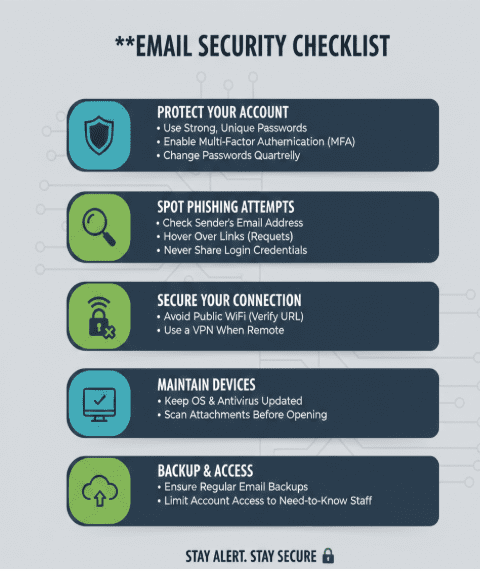
Technology handles the “spoofing,” but it can’t stop a human from clicking a bad link in a well-disguised phishing email. Here’s the simple protocol we all need to follow:
- Look for the “Off” Detail: Phishing emails usually have one tiny mistake—a misspelt name, an odd sense of urgency, or a weird link when you hover your mouse over it.
- MFA is Your Best Friend: If a hacker manages to steal your password, Multi-Factor Authentication is the only thing standing between them and our company data. Never approve an MFA request you didn’t trigger yourself. It’s worth noting that MFA is one of the eight mandatory controls in the Essential 8 framework from ASD. More info here and here
- Public Wi-Fi is a No-Go: If you’re working from a coffee shop, use a hotspot or a VPN. Open networks are essentially “listening booths” for hackers.
Our security is only as strong as the person behind the keyboard on the network we are connected to. Let’s keep our communication professional, but our defenses high
If you feel like being a technical expert then read-on.
Validating Where an Email Comes From
SPF ensures that emails sent using our domain originate only from mail servers we have explicitly approved. When a message is received, the recipient’s mail system checks the source against this approved list.
If the source does not match, the message is treated as untrusted. This mechanism blocks many spoofing attempts before they ever reach an inbox.
SPF helps protect against:
- Unauthorized email sending
- Domain misuse
- Fake internal and external messages
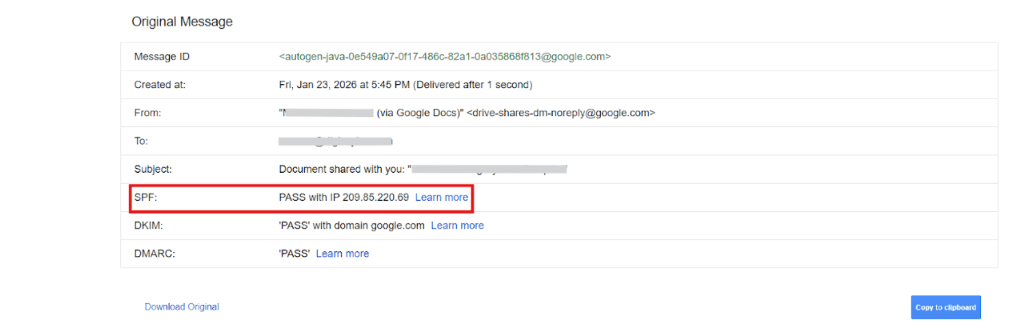
How to check the SPF record:
- Open an email sent from your company mailbox.
- Click on the three dot icon on the right side
- Select Show original (Gmail based) or Message details (Outlook)
- Locate the SPF authentication result
Ensuring the Message Has Not Been Altered
DKIM protects the integrity of an email’s content. When an email is sent, it is digitally signed. When it is received, that signature is checked to ensure nothing has been modified during delivery.
This prevents malicious changes such as altered links, attachments, or payment information being introduced after the email leaves the sender.
DKIM provides assurance that:
- The message content is original
- The email has not been tampered with
- The message is genuinely linked to the sending domain
How to check the DKIM record:
- From the same authentication details view
- Locate the DKIM result
Applying Rules When Authentication Fails
DMARC defines how receiving mail systems should react if email authentication checks do not pass. It ensures alignment between the visible sender address and verified domain identity.
By applying strict rules, DMARC reduces the chance that fraudulent emails using our domain will reach other people’s inboxes and protects our overall domain reputation.
DMARC enables us to:
- Block or quarantine suspicious messages
- Prevent misuse of our brand identity
- Maintain consistent trust with recipients
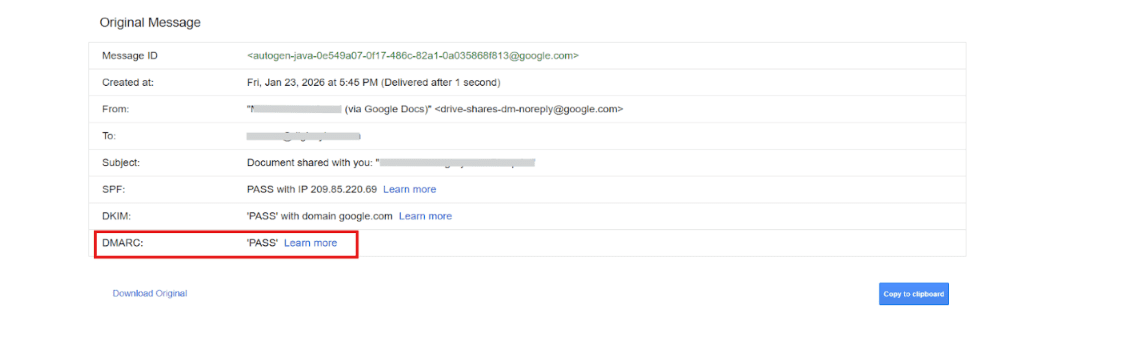
How to check the DMARC:
- Open the email’s authentication summary
- Locate the DMARC result
- Ideally capture SPF, DKIM, and DMARC together
How to Check if an Email Is Properly Authenticated
An email can be considered verified when all three authentication checks match and return a PASS result:
- SPF confirms the sending source
- DKIM confirms message integrity
- DMARC confirms policy compliance
This indicates that the email is legitimate, unmodified, and trusted by receiving systems.
The Role of Individual Awareness
Technical controls significantly reduce risk, but they cannot eliminate it entirely. Attackers may still use compromised accounts or look-alike domains to send convincing phishing emails.
Employees should remain cautious when dealing with unexpected requests, particularly those involving payments, credentials, or urgent actions. Multi-Factor Authentication approvals should only be granted when personally initiated, and secure networks should always be used when working remotely.
